Compare visually
Stop searching for changes blindly. AiActo's version comparison displays every change in color, field by field, for quick review and total control.
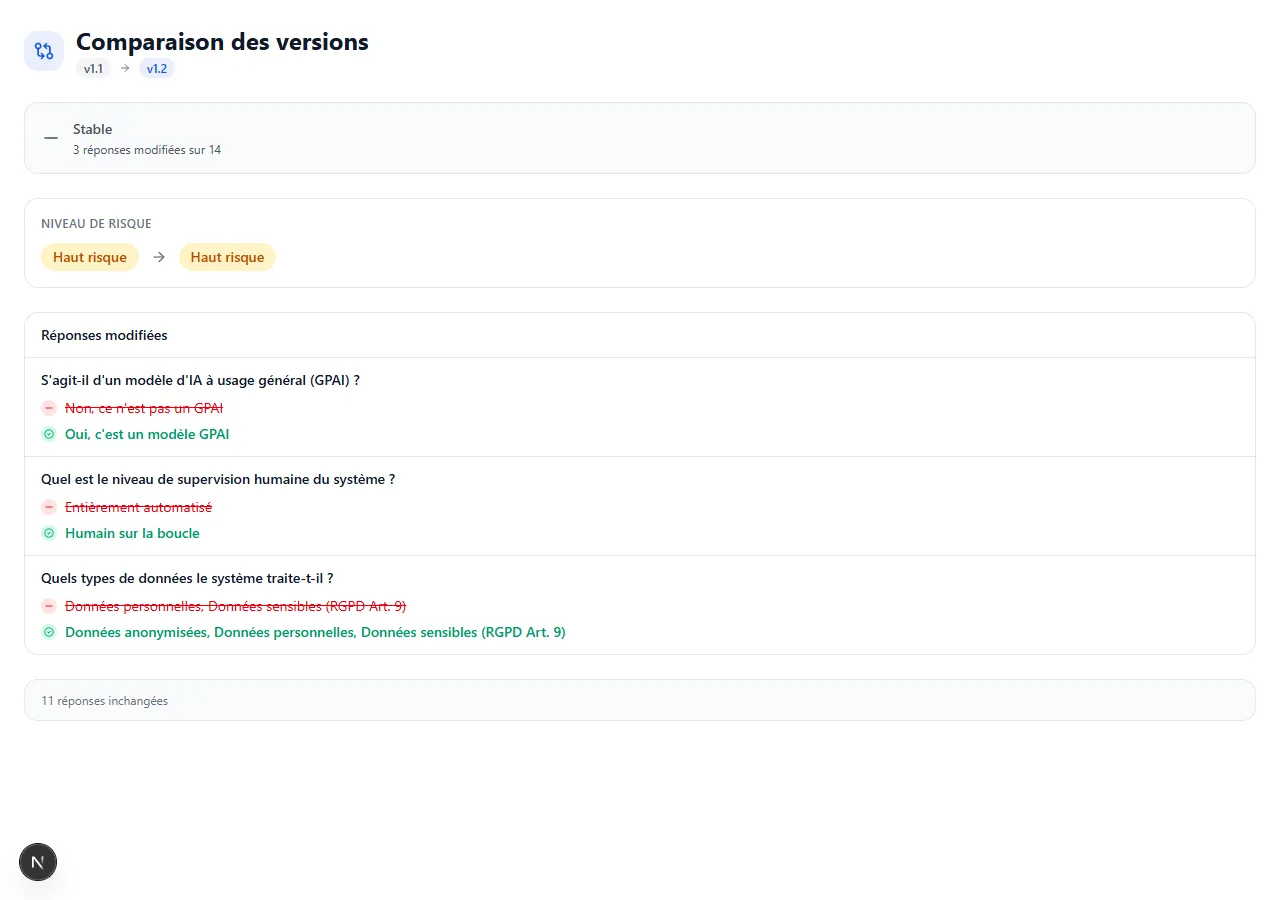
Before / After
Discover how visual comparison accelerates your review process.
Without comparison
- Rereading the entire document to find changes
- Risk of approving undetected modifications
- Impossible to identify who made a change
- Considerable time wasted during review cycles
With AiActo
- Color-coded differences: additions in green, deletions in red
- Field-by-field view with section filter
- Author and timestamp of each change identified
- Targeted review: only reread what has changed
Without comparison
- Rereading the entire document to find changes
- Risk of approving undetected modifications
- Impossible to identify who made a change
- Considerable time wasted during review cycles
With AiActo
- Color-coded differences: additions in green, deletions in red
- Field-by-field view with section filter
- Author and timestamp of each change identified
- Targeted review: only reread what has changed
How it works
Step 1
Version selection
Choose two versions to compare from the chronological history. Compare the current version with any previous version.
Step 2
Automatic analysis
AiActo analyzes each field of both versions and identifies all differences: additions, deletions, and content modifications.
Step 3
Color-coded display
Differences are presented with an intuitive color code. Navigate between sections to focus your review on the important changes.
Step 4
Selective validation
Accept or reject changes individually. Restore previous values for specific fields of your choice.
Key benefits
Visual comparison optimizes every review cycle.
Time savings
Instantly identify changes without rereading the entire document. Reduce review time by 80% on average.
Art. 11 Compliance
Technical documentation must be kept up to date. Comparison ensures that every update is verified and validated.
Effective collaboration
Reviewers see exactly what has changed since their last review. No more duplicates or missed modifications.
Quality control
Detect errors or regressions before they reach the final version. A safety net for your documentation.
Approach comparison
Visual comparison vs market alternatives.
| Manual | RecommendedAiActo | Generic diff | |
|---|---|---|---|
| Granularity | Entire document | Field by field | Line by line |
| Business context | None | AI Act sections | None |
| Color coding | Absent | Additions / Deletions | Basic |
| Restoration | Copy-paste | 1 click per field | Impossible |
| Multilingual | No | 4 languages | No |
| Workflow integration | None | Built-in review | External |
| Try for free |
Frequently asked questions
From your assessment page, access the version history and select two versions to compare. The differences are displayed instantly with color coding.
All fields of your technical documentation are compared: texts, selections, and technical data. Each difference is identified and displayed field by field.
Yes, you can restore the value of a specific field in one click directly from the comparison view, without affecting other fields.
Yes, you can compare versions in each of the 4 supported languages (French, English, German, Spanish). Comparisons are made within the same language.
You can compare any two versions from your history. The number of retained versions is unlimited.
Yes, reviewers can access the comparison to see exactly what has changed since their last review, making validation easier.
Master every change
Visually compare versions of your documentation and validate every change with confidence.